Newpos 9220 Repair Manual
The error codes below can be resolved without returning a device back to Touchpoint Payments
| Error Code | Error | Solution |
| 100 | Transaction declined by bank / blocked card | Try another card |
| 109 | Merchant ID / Terminal ID / Serial number mismatch | Please validate these settings on the iVeri server |
| 399 | Incorrect date and time on POS – Please update POS parameters | |
| 902 | Device deactivated on server | Please forward serial number to us to activate |
| 921 | Invalid data authentication | Please insert the card and process PIN based transaction |
| 908 | Unknown host | Please insert the card and process PIN based transaction |
| 909 | Various errors | Please try PIN based transaction. If still fails please call Touchpoint to further investigate before shipping back to us |
| No terminal params | Please download terminal parameters | |
| Connect fail | Please try another SIM card or switch to WIFI | |
| Attach COMM fail | Please try another SIM card or switch to WIFI | |
| Other Error | APN issue | Please check if “backspace” is correct in COMMS settings |
| Invalid Params | APN issue | Please check if “backspace” is correct in COMMS settings |
| Error 122 | Track 2 missing | Check with iveri server if Track 2 is captured correctly |
General instruction on checking the devices that have been returned to Nedbank/Avis
- Each device must have a printed receipt attached to the device that confirms that Touchpoint has not only repaired the device, but proof that the device was tested in a ‘live’ environment.
- Please pay attention to the codes that have been printed on the receipts, usually the code,100/101 is generated by a test card, However sometimes the repairs have been tested with a live card with a cost of 10 cent.
- The device has to be charged once they are returned to Nedbank/Avis.
- Patience has to be exercised, when charging or switching the device on, as it may take a few seconds.
- Ensure that the device is inserted with a working Sim card once returned.
- The network should have a strong coverage and is within range.
- Allow the terminal at least a minute to acquire network coverage, see the terminal will display the network signal as per screen below.
Reasons that can be resolved by Nedbank/Avis for Repairs but if the terminal can’t be resolved please send it back to Touchpoint for Repairs.
- Card Reader- This error is reflected when the device is unable to read the card that was inserted, due to an unreadable card chip or damaged contact pins. Should this error occur, please use another card to test the device.
- Cancels Payment/ Timeout – The SIM cards/network is the main contributor for cancelling payment. This is automatic when the terminal loses a connection to the server.
- Ensure that the network signal is strong enough for the transaction to be processed.
- Machine Cancels- The SIM cards/network is the main contributor for cancelling payment. This is automatic when the terminal loses a connection to the server
- Not Charging - Red LED light -It means that the terminal is charging. Orange LED Light It means that the battery is full or maybe faulty.(If so please send it back to Touchpoint for repairs).
Please see below the list of faults that’s needs to be attended by the Touchpoint repair team
- Stuck on first screen – A software related issue, therefore reloading the software will resolve challenge.
- Blank Screen- The device has to be charged. If the problem persists, please return to Touchpoint.
- LCD/Hardware failure – There are various reasons this could occur, which could either be in transit where the device could have been mishandled and must be returned to Touchpoint.
- Tamper Source- There is detection internally of interference and this is a failsafe that automatically occurs when there is an attempt to open the terminal. These sensors can also be triggered during transit. Please send the device to Touchpoint.
Please see the steps below for communication parameters, (Please ensure the settings are correct before updating all parameters, These steps helps you resolves any comms issue ).
Step 1: Please click on setting icon and input user password
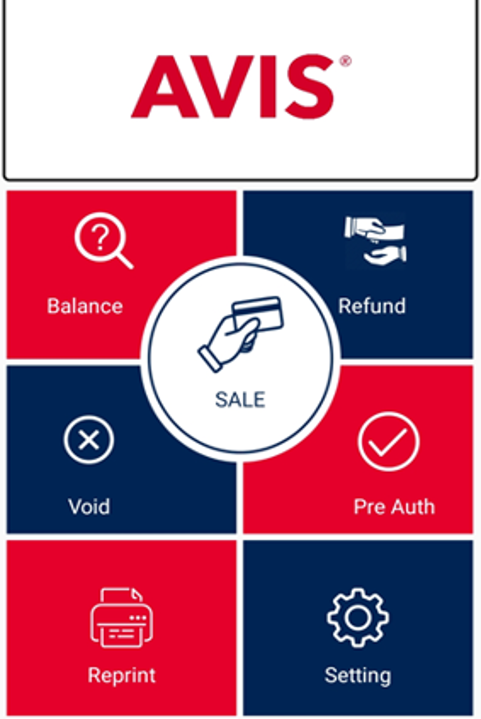
Step 2: Please click on Communications parameters
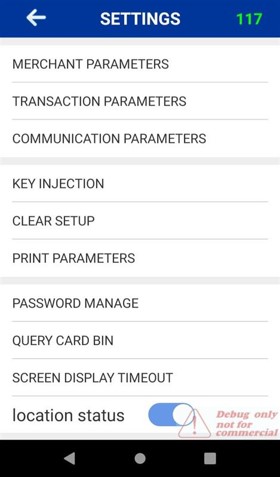
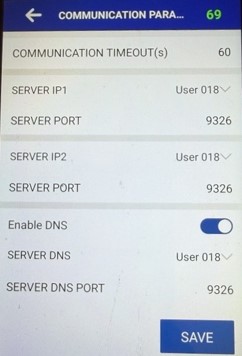
Step 3: Please make sure the below information is correct.
SERVER IP 1 User 018 (196.013.126.012) - SERVER PORT 9326
SERVER IP 2 User 018 (196.013.126.012) - SERVER PORT 9326
SERVER DNS User 018 (PROD-AVIS-LB-POSPort-04980a24db275a1e.elb.af-south-1.amazonaws.com) - SERVER DNS PORT 9326
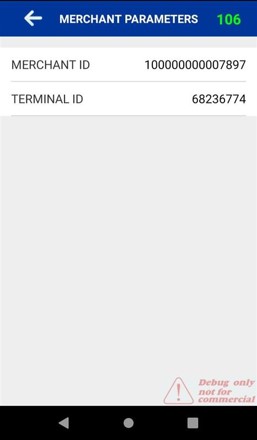
Please see the steps below for Merchant parameters, (Please ensure the TID and Mid are correct for error 109 or Invalid parameters).
Step 1: Please click on setting icon and input user password
Step 2: Please click on Merchant parameters
Step 3: Please make sure the below information is correct.
TID – Each TID gets generated for per Merchants.
MID – Each MID is different to each branch